主页
主页
 应用
应用






Samsung Notes for SAMSUNG IWB
Samsung Notes for IWB 可以在 Samsung Interactive Display 上创建和...

100,000+
全球下载量-
捆绑包ID
com.samsung.android.app.notesforifpd
-
开发人员
Samsung Electronics Co., Ltd. -
应用类型
商务办公 -
价格
免费 -
更新时间
2025年12月03日 -
1261个评分
4.4724407
-
捆绑包ID
com.samsung.android.app.notesforifpd -
开发人员
Samsung Electronics Co., Ltd. -
应用类型
商务办公
-
价格
免费 -
更新时间
2025年12月03日 -
1261个评分
4.4724407
 屏幕截图和多媒体

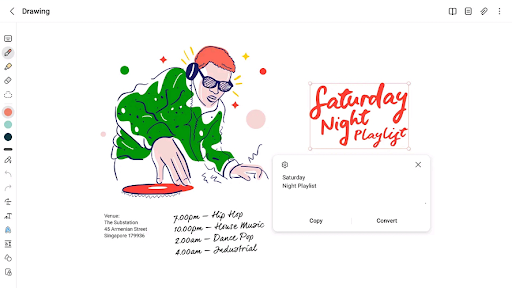
 应用信息
应用信息
 ***********
 描述
描述
Samsung Notes for IWB can create and edit documents on SAMSUNG Interactive Display.User can add annotations to the PDF and create documents with images or voices.
It can also be used by connecting documents with various apps such as PDF, Microsoft Word, Microsoft PowerPoint, etc.
Try creating a new note.
You can create a new note by tapping + in the bottom right corner of the main screen.
Newly created notes will have the “sdocx” extension.
Protect your notes.
1. On the main screen, tap More Options in the upper right corner, select Settings, then select Lock Note.
Then select a note locking method and password.
2. Lock the notes you want to protect by tapping More Options on the screen of the note you want to protect and selecting Lock Note.
Create handwritten notes.
Tap the Handwriting icon while writing a note. Your handwriting will be displayed directly on the note.
Add photos.
Tap the photo icon in the note you are working on to take a photo. You may also load, add tags to and edit an existing photo.
Add a voice recording.
By tapping the Voice Recording icon while writing a note, you can record sound and create a note with sound.
Try using various writing tools.
By tapping the Pen icon while writing a note, you can select a variety of writing tools such as pens, fountain pens, pencils, highlighters, etc., as well as various colors and thicknesses.
By tapping the Eraser icon, you can select and erase content that you want to remove.
You can import notes and memos created in Notes and Memo.
You can also import previously created notes and memos with your Samsung account.

 热门IAP
热门IAP
--
 版本历史
版本历史
| 版本 | 时间 |
| 1.5.00.5 | 2025年12月03日 |
| 1.5.00.4 | 2025年11月25日 |
| 1.5.00.2 | 2024年12月11日 |
| 1970年01月01日 | 1970年01月01日 |
准备中...
应用排名趋势
近7天
近30天
 自定义
自定义
近7天
近30天
自定义
近7天
近30天
自定义
近7天
近30天
自定义
下载量趋势
近7天
近30天
近90天
自定义